
Active compression
Active compression is the set of features that shrink content as it enters your context window, rather than after the fact. This page is the map; each feature has its own page with the full detail.
What it covers
Section titled “What it covers”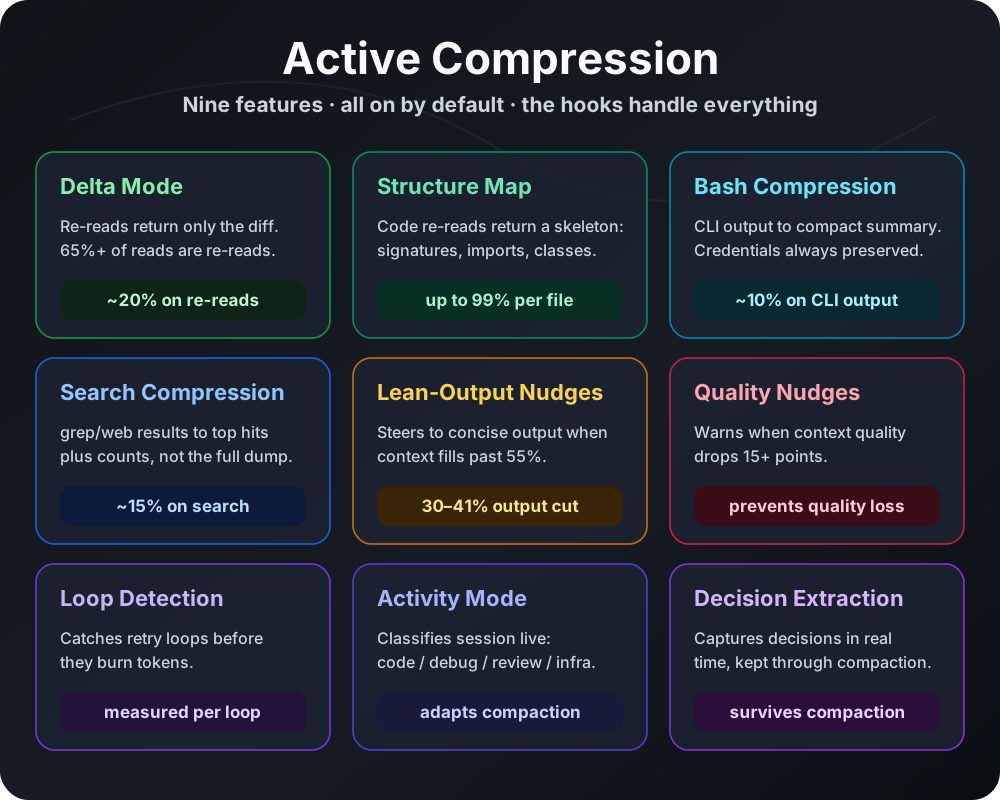
The setup audit reduces the overhead you start a session with. Active compression reduces the overhead you accumulate during the session: redundant file re-reads, verbose command output, and large tool results that survive into compaction. Each feature targets one source of mid-session bloat and each is on by default where it is safe to be.
Several of these features are documented in depth on their own pages. This page exists so you can see them together, understand their defaults at a glance, and learn the single command that manages the whole suite.
At a glance
Section titled “At a glance”| Feature | Default | Targets | Typical saving | Risk | Page |
|---|---|---|---|---|---|
| Read cache (delta mode) | On | Re-reading an unchanged or barely-changed file | A 2,000-token re-read becomes a 50-token diff | Low | Read cache |
| Read cache (structure map) | On (soft-block) | Re-reading a large code file | A 720KB file becomes a 250-token skeleton | Low | Read cache |
| Bash output compression | On | Verbose read-only CLI output | A 564-token pytest run becomes 115 tokens | Low | Bash compression |
| Search result compression | On | Long grep/search results | 500-line result becomes 20 lines + count | Low | Bash compression |
| Quality nudges | On | A sudden quality drop you should act on | A timely compact instead of a degraded context | None | Quality signals |
| Loop detection | On | The agent stuck retrying the same thing | Caught before it burns more turns | None | Quality signals |
| Lean-output nudges | On | Verbose model output at high context fill | Estimated 10-15% (not counterfactually measured) | None | (this page) |
Two more features round out the nine, but they feed the compaction engine rather than shrinking content as it enters context, so they live on the Quality signals page: Activity Mode (classifies the session into one of five modes from the last ten tool calls, so compaction keeps what that phase needs) and Decision Extraction (carries the five most recent decisions across each compaction).
How to manage all of them
Section titled “How to manage all of them”One command controls the runtime compression features as a group. The CLI verb is v5 (a legacy name kept for compatibility — it controls current features, not a version).
cd ~/.claude/skills/token-optimizer/scripts
# Show the status of every active compression featurepython3 measure.py v5 status
# Turn one feature on or offpython3 measure.py v5 disable delta_modepython3 measure.py v5 enable delta_mode
# Full detail for one featurepython3 measure.py v5 info delta_mode
# First-run welcome and summarypython3 measure.py v5 welcome
Feature names accepted by enable and disable: bash_compress, delta_mode, structure_map_beta, quality_nudges, loop_detection, first_read_shadow, first_read_active. Toggle state persists to config.json.
Default state
Section titled “Default state”Every active compression feature is on by default on Claude Code, where the PreToolUse and PostToolUse hooks can intercept tool calls. On platforms with reduced hook support, some features are approximated or unavailable; the capability matrix lists the per-platform reality.
How to turn off
Section titled “How to turn off”Turn off the whole behavior of one feature with its v5 disable verb above, or with its environment variable for a one-off. The two read-cache behaviors share TOKEN_OPTIMIZER_READ_CACHE (both off) and TOKEN_OPTIMIZER_READ_CACHE_DELTA (delta only). Bash compression uses TOKEN_OPTIMIZER_BASH_COMPRESS, which also gates search-result compression (there is no separate search variable). Quality nudges and loop detection use TOKEN_OPTIMIZER_QUALITY_NUDGES and TOKEN_OPTIMIZER_LOOP_DETECTION. Lean-output nudges have no on/off switch: they are not a v5 feature. Their trigger point is tunable with TOKEN_OPTIMIZER_VERBOSITY_MIN_FILL (default 25). All are defined in the configuration reference.
Risk rating
Section titled “Risk rating”Low overall. Each compression feature fails open: when a substitution might lose information the model needs, the feature serves the full content instead. The two warning features (quality nudges, loop detection) only add a note for the model to read, so their risk is none. Per-feature failure modes are documented on each page.
Related environment variables
Section titled “Related environment variables”TOKEN_OPTIMIZER_BASH_COMPRESS, TOKEN_OPTIMIZER_READ_CACHE, TOKEN_OPTIMIZER_READ_CACHE_DELTA, TOKEN_OPTIMIZER_STRUCTURE_MAP, TOKEN_OPTIMIZER_QUALITY_NUDGES, TOKEN_OPTIMIZER_LOOP_DETECTION. All defined in the configuration reference.
Platform availability
Section titled “Platform availability”Full suite on Claude Code CLI and VS Code. Approximated or partial on Codex, Copilot, Hermes, OpenClaw, and OpenCode depending on each platform’s hook capabilities. See the capability matrix.
Related pages
Section titled “Related pages”- Read cache: delta mode and structure map in depth.
- Bash output compression: handlers and the credential-safety model.
- Quality nudges and loop detection: the two real-time alerters.
- Tool result archive and expand: durability for large results across compaction.
- Configuration reference: every variable and config key.