
Your data and privacy
Token Optimizer runs entirely on your machine. It reads files that already exist, writes a few local data stores, and sends nothing anywhere. This page is the operator reference for exactly what is stored, where, for how long, and how to delete it.
No external data transmission
Section titled “No external data transmission”- No telemetry. No usage data, analytics, or metrics leave the machine.
- No runtime network calls. The only runtime network activity is a loopback-only (127.0.0.1) dashboard server for local visualization.
- Install and update checks contact GitHub (
api.github.com) to verify release integrity. No product data is sent in that request. - No accounts, no sign-up, no third-party services.
What it reads
Section titled “What it reads”To run its analysis, Token Optimizer reads files already on your machine:
- Host-platform session transcripts (JSONL files under
~/.claude/projects/) ~/.claude/settings.jsonand project-level.claude/settings.json~/.claude/CLAUDE.md, project-levelCLAUDE.md, and~/.claude/MEMORY.md- Skill and command directories under
~/.claude/ - MCP server configurations
These are read locally and never transmitted.
Where data lives
Section titled “Where data lives”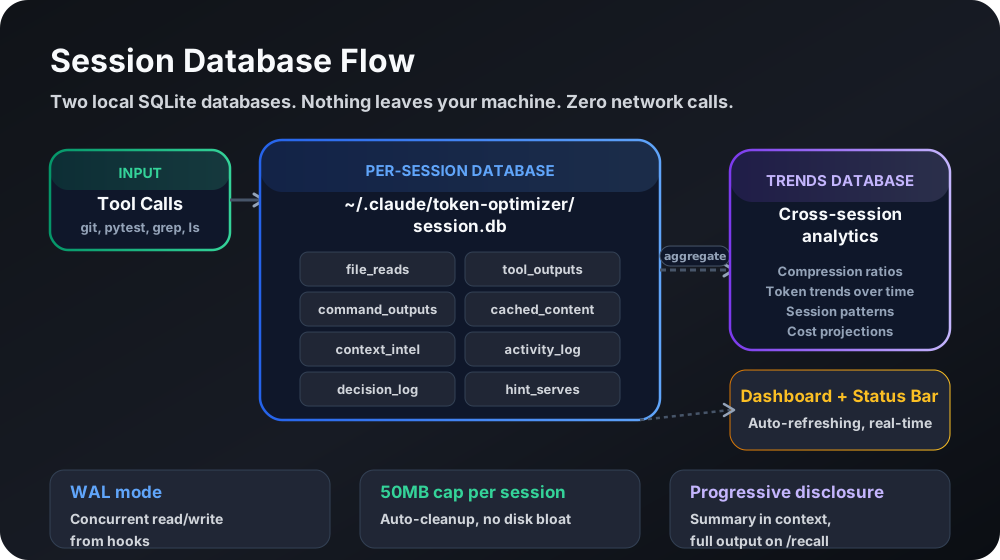
Every store is created with restrictive permissions: directories 0o700 (owner only), files 0o600 (owner read/write only).
| Store | Contents | Path | Retention |
|---|---|---|---|
| Session metrics database | Per-session aggregates: token counts, model usage, cost estimates, session UUIDs, JSONL paths | <plugin-data>/data/trends.db | TOKEN_OPTIMIZER_TRENDS_RETENTION_DAYS (default unlimited) |
| Per-session file cache | File-read records, content hashes, token estimates, cached content up to 50KB per file (credential-redacted) | <plugin-data>/data/session-store/<id>.db | Auto-deleted after 48 hours |
| Checkpoints | Truncated conversation context, extracted decisions, error snippets, todos | ~/.claude/token-optimizer/checkpoints/ | TOKEN_OPTIMIZER_CHECKPOINT_RETENTION_DAYS (default 7), max TOKEN_OPTIMIZER_CHECKPOINT_RETENTION_MAX (default 50) |
| Tool archives | Full output of large tool calls (over 4KB), credential-redacted | <plugin-data>/data/tool-archive/<id>/ | TOKEN_OPTIMIZER_ARCHIVE_RETENTION_HOURS (default 24) |
| Quality cache | Per-session quality-score snapshots | ~/.claude/token-optimizer/quality-cache-*.json | TOKEN_OPTIMIZER_QUALITY_CACHE_RETENTION_DAYS (default 7) |
| Config | Feature flags, consent status, pricing tier, timestamps | ~/.claude/token-optimizer/config.json | Persistent until purge |
| Checkpoint event log | Checkpoint telemetry events | ~/.claude/token-optimizer/checkpoint-events.jsonl | Rotated at 1000 entries |
| Live fill cache | Current context-fill value for the status line | ~/.claude/token-optimizer/live-fill.json | Overwritten continuously |
| Dashboard | Generated HTML visualization | <plugin-data>/data/dashboard.html | Regenerated on demand |
| Daemon token | 32-byte random secret for dashboard POST auth | <plugin-data>/data/daemon-token | Persistent (0600) |
| Daemon logs | Dashboard server stdout/stderr | <plugin-data>/data/logs/ | Persistent until purge |
The history database holds JSONL file paths, which embed your local username as a path component. Checkpoints hold truncated conversation snippets (up to 300 characters of the last user and assistant messages, error snippets up to 150 characters) that may contain anything you typed into the coding assistant.
Credential handling
Section titled “Credential handling”Token Optimizer scans for 22 credential pattern types (AWS keys, API tokens, GitHub PATs, database URIs, JWTs, PEM keys, and more) and replaces each with [CREDENTIAL REDACTED: <type>] before writing to the session store and tool archive. Redaction is one-way and permanent in stored content.
Two deliberate tradeoffs follow from this:
- Delta reads against a file containing a credential produce a non-empty diff on every re-read, because the stored copy holds the redacted placeholder and the live file holds the real value. Security wins over efficiency here.
- Bash compression output preserves credential-containing lines verbatim rather than redacting them, so the compressed output returned to the model never mangles a secret the model needs to act on.
Consent
Section titled “Consent”On first activation, Token Optimizer shows a data notice describing what is stored locally and requires acknowledgment before any collection begins. Until consent is granted, hooks exit early: no data collection, no blocking of tool calls.
python3 measure.py consent --show # check statuspython3 measure.py consent --grant # grantpython3 measure.py consent --reset # revokeConsent is tracked per-runtime. Running both Claude Code and Codex requires acknowledging in each. Users who already saw the earlier welcome notice are treated as consented for backward compatibility.
The bookmarkable dashboard URL has its own separate consent, managed with daemon-consent. So does Keep-Warm, which is opt-in and requires keepwarm-enable.
Transcript preservation
Section titled “Transcript preservation”To keep enough history for trend analysis, Token Optimizer sets cleanupPeriodDays=99999 in the host platform’s settings.json. That is the host platform’s cleanup setting for the host platform’s own transcripts, not a Token Optimizer data store. You can override it in your settings.json, and purge does not delete transcripts because they belong to the host platform.
Deleting your data
Section titled “Deleting your data”The purge command deletes all Token Optimizer data across all platforms. It is dry-run by default.
python3 measure.py purge # dry-run: lists what would be deletedpython3 measure.py purge --confirm # delete the history db, checkpoints, archives, cachespython3 measure.py purge --force # also stop the daemonTo delete by hand instead, remove these directories:
~/.claude/token-optimizer/~/.claude/plugins/data/token-optimizer-*/~/.claude/_backups/token-optimizer/- Codex:
~/.codex/token-optimizer/ - OpenCode:
~/.local/share/opencode/token-optimizer/
purge is the right tool for a GDPR-style deletion request or a clean uninstall. It removes everything Token Optimizer created and leaves the host platform’s own transcripts intact.
Cross-platform
Section titled “Cross-platform”The same guarantees hold on every supported platform: local-only, zero network, credential-redacted storage. Data paths vary by platform; the architecture is identical. On Hermes, the adapter opens state.db read-only and immutable (mode=ro&immutable=1 with PRAGMA query_only = ON) and never writes back to it.
Source available
Section titled “Source available”The full source is published at github.com/alexgreensh/token-optimizer and can be audited by anyone. For the security architecture in depth (loopback binding, token-gated POST endpoints, access controls), run measure.py security-report or see Health and diagnostics. For privacy questions, contact Alex Greenshpun or open a GitHub issue.