
The quality status line
The quality status line puts two numbers in your Claude Code terminal that a single session view never shows together: how full the context window is, and how well the context is actually being used right now. You read them at a glance and compact at the right moment instead of guessing.
What it does
Section titled “What it does”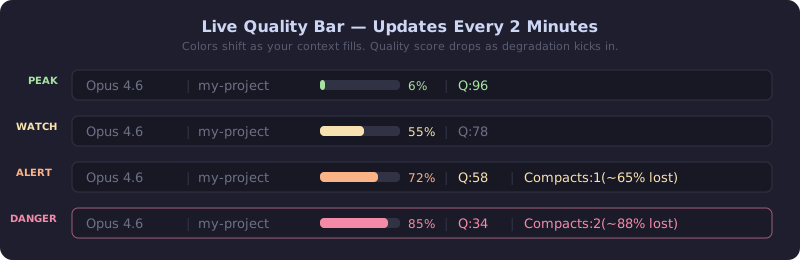
The status line renders a compact two-row readout below your prompt. The first row shows your model, the project directory, a context-fill bar with a used percentage, and the context-quality grade. The second row adds session-efficiency, any active warnings, compaction count, session duration, and running agents.
Claude | med | my-project | ████████░░ 78% | ContextQ:C(62)Eff:B(74) | Compacts:1 | ↺2:14The fill bar is color-banded so a glance tells you the state: green under 50%, yellow to 70%, orange to 80%, and red above 80%. The quality grade runs from S (90+) down to F, and carries the same value-color so a low grade reads as a warning. A ~ prefix on the grade means the cached score is older than five minutes and may not be live.
The grade is the same context-quality score documented in quality scoring. The status line is how you watch it move without running a command.
Where the numbers come from
Section titled “Where the numbers come from”The fill percentage comes from the data Claude Code hands the status line on every render. The quality grade comes from a small cache file that Token Optimizer’s hooks keep updated.
A UserPromptSubmit hook recomputes the quality score on a roughly two-minute throttle and writes it to ~/.claude/token-optimizer/quality-cache-<session_id>.json. The status line reads that file on each render. Because the cache is refreshed on a throttle rather than every keystroke, the status line applies a five-minute staleness guard: past that age it marks the grade with ~ rather than showing a frozen number as if it were live.
Install and uninstall
Section titled “Install and uninstall”setup-quality-bar installs the status line into ~/.claude/settings.json and wires the quality-cache hook that feeds it.
-
Install the status line and its hook:
Terminal window cd ~/.claude/skills/token-optimizer/scriptspython3 measure.py setup-quality-bar -
Preview the change first, or check the current state, without writing:
Terminal window python3 measure.py setup-quality-bar --dry-runpython3 measure.py setup-quality-bar --status
To remove it:
cd ~/.claude/skills/token-optimizer/scriptspython3 measure.py setup-quality-bar --uninstallUninstalling removes the status line and records a sticky opt-out (quality_bar_disabled in config.json) so it does not reappear on the next session start. Run setup-quality-bar again to clear the opt-out and reinstall.
Default state
Section titled “Default state”On for plugin and marketplace users. The SessionStart ensure-health hook auto-installs the status line through setup-quality-bar when your statusLine slot is empty, and respects the quality_bar_disabled opt-out. Skill-only users install it once with the command above.
Platform availability: the terminal status line is a Claude Code surface. Codex has its own status-line command (codex-status-line). OpenClaw has no terminal status-line surface. See the capability matrix.
The /statusline clobber and auto-restore
Section titled “The /statusline clobber and auto-restore”Claude Code’s /statusline command rewrites the statusLine setting, which replaces the quality bar with whatever it generates. How Token Optimizer responds depends on how you installed it.
For skill-only installs, the status line is restored: the next SessionStart ensure-health detects that the slot no longer holds the quality bar and reinstalls it, unless you have set the opt-out.
For plugin installs, there is no auto-restore after /statusline clobbers the bar. Claude Code exposes no signal that distinguishes an accidental clobber from a status line you chose on purpose, so the plugin does not second-guess your choice. This is a deliberate, accepted trade-off. To get the quality bar back after /statusline replaces it, run setup-quality-bar again.
Reading the cache from a custom status line
Section titled “Reading the cache from a custom status line”If you maintain your own status line and want the quality grade in it, read the cache file directly. Token Optimizer writes the per-session score to:
~/.claude/token-optimizer/quality-cache-<session_id>.jsonThe file holds the score under resource_health (falling back to score), a letter grade under resource_health_grade (falling back to grade), and a session-efficiency score under session_efficiency. Apply your own staleness check against the file’s timestamp; the bundled status line treats a score older than five minutes as stale. The quality-cache hook keeps the file current as long as Token Optimizer is installed, so a custom status line gets the same live grade without running any Token Optimizer command itself.
When it updates
Section titled “When it updates”Automatically. The fill bar updates on every status-line render. The quality grade updates whenever the quality-cache hook runs, which is on UserPromptSubmit (throttled to about two minutes) and after tool use, with a force-refresh on SessionStart and after compaction.
Defaults and thresholds
Section titled “Defaults and thresholds”| Setting | Default | Notes |
|---|---|---|
| Layout | two rows | Row 1: fill + ContextQ. Row 2: efficiency, warnings, compacts, duration, agents |
| Fill color bands | under 50 green, under 70 yellow, under 80 orange, 80+ red | On the used percentage |
| Quality grades | S 90+, A 80+, B 70+, C 55+, D 40+, F below | Same score as quality scoring |
| Staleness mark | ~ after 5 minutes | Cache older than the guard window |
| Quality-cache refresh | ~2-minute throttle | On UserPromptSubmit and PostToolUse |
| Auto-install | on (plugin) | When statusLine slot is empty |
| Opt-out | quality_bar_disabled | Set by --uninstall, sticky |
Risk rating
Section titled “Risk rating”None. The status line only displays. It never edits your conversation, and installing it only writes the statusLine setting (and only when the slot is empty). The worst case if the cache is missing or stale is a -- or ~-marked grade, not a wrong action.
Related environment variables
Section titled “Related environment variables”The status line is controlled by the setup-quality-bar command and the quality_bar_disabled config key rather than environment variables. Both are defined in the configuration reference.
Platform availability
Section titled “Platform availability”Claude Code CLI and VS Code. Codex uses codex-status-line. OpenClaw has no terminal status-line surface. See the capability matrix.
Related
Section titled “Related”- Quality scoring: the 7 signals behind the grade and what the degradation cliff is.
- Quality nudges and loop detection: the alerts that fire on the same quality cache the status line reads.
- Smart compaction: what to do when the bar tells you to compact.
- Configuration: the
quality_bar_disabledkey and related settings. - CLI reference:
setup-quality-barandquality-cache.