
Quality signals
Quality signals are the read-only alerting and metadata layer. The four features on this page add short notes or structured data to the session in real time, fired by hooks, with no content removed or rewritten.
Two are user-visible alerters: Quality Nudges warn when the session is degrading, Loop Detection flags when the model is stuck. Two are internal infrastructure: Activity Mode classifies what kind of work the session is doing, and Decision Extraction captures decisions in real time so they survive compaction. All four are on by default and run across all supported platforms.
What each feature does
Section titled “What each feature does”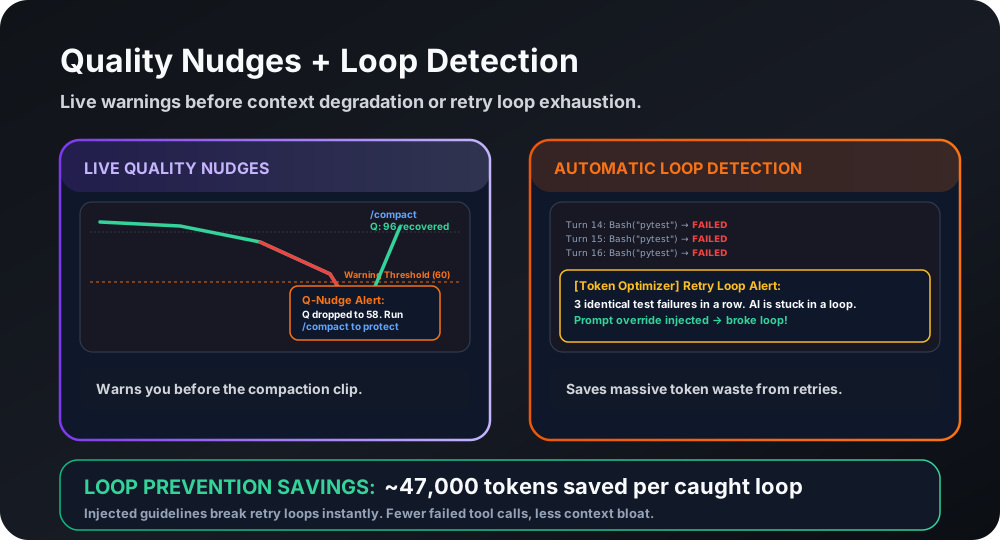
Quality Nudges watch the running context quality score. When the score drops more than 15 points in a single measurement, or crosses below 60, a short inline note enters the context. The model surfaces it on the next turn, prompting a timely /compact before the session degrades further. The note is suppressed on the first check immediately after a compaction (to avoid false alarms right after the context was just cleaned).
Loop Detection watches for repetition across the last four user messages and the last five tool results. It does not compute semantic similarity. A message loop is flagged when those recent messages all sit within 20% of their average length, a cheap proxy for the same request being retyped. Retry churn is flagged when at least three of the recent tool results are short failures from the same tool. Each signal carries a fixed confidence, 0.7 for a message loop and 0.75 for retry churn, and a warning fires only when the strongest signal is at least 0.6. When it fires, a short warning enters the context. Post-hoc analysis of real sessions found that loop sessions average 47,000 wasted tokens before the user notices. The notes use fixed templates and never echo your content back.
Activity Mode Detection classifies the current session into one of five modes: code, debug, review, infra, or general. Classification runs on a sliding window of the last ten tool calls after every PostToolUse event. The result feeds the active compression compaction engine, which selects mode-aware PRESERVE and DROP priorities when /compact runs. The activity log auto-prunes at 30 rows to avoid unbounded growth.
Decision Extraction monitors tool outputs in real time for decision statements, patterns like “chose X because Y”, “going with Z over W”, or “switched to”. It runs only on outputs over 500 characters (to skip short noise). Detected decisions are stored in the session database via SessionStore’s auto-commit get_meta/set_meta and injected as a CRITICAL DECISIONS block at compaction time, so the context stays decision-aware after every /compact.
When features fire
Section titled “When features fire”All four run automatically via hooks. No manual invocation is needed.
| Feature | Hook | Trigger |
|---|---|---|
| Quality Nudges | UserPromptSubmit (quality-cache) | Quality score drops more than 15 points or crosses below 60 |
| Loop Detection | UserPromptSubmit (quality-cache) | Last 4 user messages within 20% of average length, or 3+ short failures from one tool in the last 5 results |
| Activity Mode | PostToolUse | Every tool call, no threshold |
| Decision Extraction | PostToolUse | Tool output over 500 characters |
Default state
Section titled “Default state”All four features are on by default on all supported platforms. No setup is required after installation.
How to turn off
Section titled “How to turn off”Quality Nudges and Loop Detection can be disabled. Activity Mode and Decision Extraction are internal infrastructure with no user-facing disable path; they run silently and impose no visible output.
Quality Nudges: environment variable
TOKEN_OPTIMIZER_QUALITY_NUDGES=0Set in your shell profile or .env file. See the configuration reference for where env vars are read.
Quality Nudges: CLI disable
cd ~/.claude/skills/token-optimizer/scriptspython3 measure.py v5 disable quality_nudgesLoop Detection: environment variable
TOKEN_OPTIMIZER_LOOP_DETECTION=0Loop Detection: CLI disable
cd ~/.claude/skills/token-optimizer/scriptspython3 measure.py v5 disable loop_detectionActivity Mode and Decision Extraction are internal-only. There is no disable path. They produce no user-visible output and carry zero risk (see Risk rating below).
Commands
Section titled “Commands”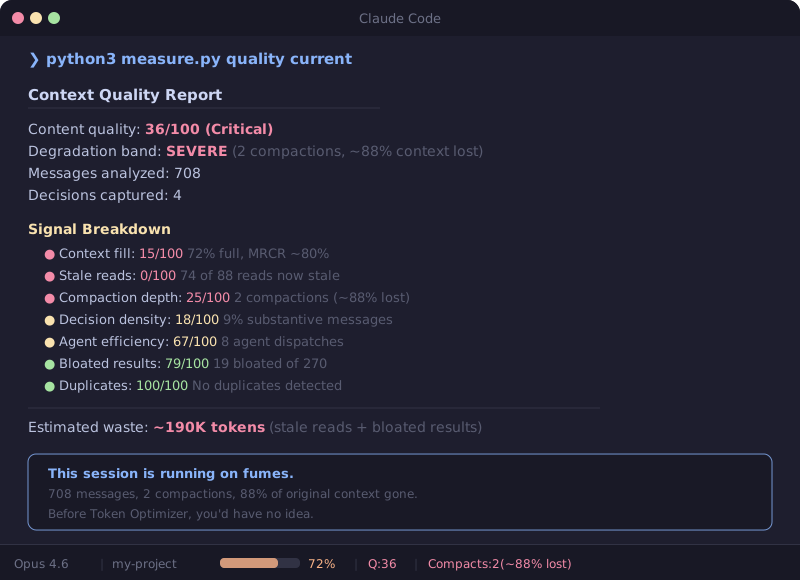
Check current status of the quality-cache hook and signal features:
cd ~/.claude/skills/token-optimizer/scriptspython3 measure.py quality-cache statusCheck session signal statistics (nudge count, loop count, decisions stored):
python3 measure.py compression-statsCheck which signal features are enabled:
python3 measure.py v5 statusRe-enable a disabled feature:
python3 measure.py v5 enable quality_nudgespython3 measure.py v5 enable loop_detectionDefaults and thresholds
Section titled “Defaults and thresholds”| Feature | Parameter | Value |
|---|---|---|
| Quality Nudges | Drop threshold | more than 15 points in one measurement |
| Quality Nudges | Floor threshold | 60 (crossing below this also fires) |
| Quality Nudges | Cooldown | 5 minutes |
| Quality Nudges | Session cap | 3 nudges |
| Quality Nudges | Post-compact suppression | Yes (first check after compact skipped) |
| Loop Detection | Message-loop rule | Recent messages within 20% of average length (average above 50 chars) |
| Loop Detection | Retry-churn rule | 3+ short (<400 char) failures from the same tool |
| Loop Detection | Firing floor | Strongest signal ≥ 0.6 (message loop 0.7, retry churn 0.75) |
| Loop Detection | User message window | Last 4 messages |
| Loop Detection | Tool result window | Last 5 results |
| Loop Detection | Session cap | 2 warnings |
| Loop Detection | Note style | Fixed templates, no content echo |
| Decision Extraction | Minimum output size | 500 characters |
| Decision Extraction | Session cap | 10 decisions |
| Decision Extraction | Write method | SessionStore auto-commit get_meta/set_meta |
| Activity Mode | Classification window | Last 10 tool calls |
| Activity Mode | Activity log prune | 30 rows |
| Activity Mode | Modes | code, debug, review, infra, general |
Risk rating
Section titled “Risk rating”None. The entire signal layer is read-only. Quality Nudges and Loop Detection add short inline notes. Activity Mode writes a local classification. Decision Extraction writes to a local SQLite database. No content is removed, rewritten, or sent anywhere. All writes are to local files you own.
Related environment variables
Section titled “Related environment variables”| Variable | Effect | Default |
|---|---|---|
TOKEN_OPTIMIZER_QUALITY_NUDGES | Set to 0 to disable Quality Nudges | 1 (enabled) |
TOKEN_OPTIMIZER_LOOP_DETECTION | Set to 0 to disable Loop Detection | 1 (enabled) |
Full env var list with accepted values and load order: configuration reference.
Platform availability
Section titled “Platform availability”| Platform | Quality Nudges | Loop Detection | Activity Mode | Decision Extraction |
|---|---|---|---|---|
| Claude Code | Full | Full | Full | Full |
| Codex | Partial (quality-cache runs, hook surface differs) | Partial | Full | Full |
| Others | Verify | Verify | Full | Full |
Codex has a different hook surface for UserPromptSubmit-based features. The quality-cache hook fires, but timing and trigger behavior may differ from Claude Code. Activity Mode and Decision Extraction use PostToolUse, which is consistent across platforms.
See the capability matrix for a full platform breakdown.
Related pages
Section titled “Related pages”- Active compression: overview of all compression and signal features, including Quality Nudges and Loop Detection in the features-at-a-glance table.
- Smart compaction: where Decision Extraction output is injected as CRITICAL DECISIONS at compact time.
- Tool result archive and expand: durability for large results across compaction.
- Configuration reference: env vars, config keys, and load order.
- CLI reference:
quality-cache status,compression-stats,v5 status,v5 enable,v5 disable(thev5verb is a legacy command name).